Turn your mobile phone into a cricket stadium and follow every match live, ensuring that no important moment goes unnoticed with JioHotstar.
Ad
Which cricket fan has never been frustrated by missing the decisive moment of an epic match? It’s a universal pain, isn’t it?
With the strategic union of streaming giants, it is now much easier to follow every play, wherever you are, using the JioHotstar app.
Ad
In February 2025, Disney and Reliance (via Viacom18) merged their platforms in India, creating JioHotstar.
This new platform combines the best of Disney+ Hotstar and JioCinema, becoming the ultimate destination for sports fans.
The idea behind this union was simple: to give the cricket fan the best possible streaming experience, with the guarantee that the world’s biggest tournaments would be gathered in one place.
This post will help you master JioHotstar and ensure your passion for cricket is lived to the fullest.

Main Cricket Leagues and Championships Available on Hotstar
JioHotstar has established itself as the official home for the most prestigious events. It ensures that your cricket calendar is always complete.
- Indian Premier League (IPL): The 2025 season was broadcast live on JioHotstar and broke records, with 1.19 billion combined views between TV and digital.
- ICC Men’s Cricket World Cup: The main global cricket tournament, guaranteed for fans on the platform.
- India Tour of Australia and India Tour of England: Follow India’s exciting series against its biggest rivals. The five test series against England was streamed exclusively on the app.
- Major League Cricket (MLC): The 2025 season, which consecrated MI New York, had full coverage on the app.
- Pro Kabaddi League: For those looking for action and strategy, the league completes the sports catalog.
Exclusive App Features for Cricket Fans

What really sets the application apart is the focus on transforming viewing into an immersive and interactive experience.
- Immersive cricket mode: The ideal feature. Includes integrated live scorecards and the ability to select multiple camera angles in real time. You are in control of the broadcast.
- Riya voice assistant: Facilitates navigation and interaction, allowing you to find specific content or moments just by speaking.
- Real time dubbing with Voice Print: Allows you to listen to commentary in your preferred language, with human emotion and intonation preserved.
- Jeeto Dhan Dhana Dhan: A gamification feature that allows you to play during live matches and win exciting rewards.
How to Set Up Alerts to Never Miss a Match
Missing a game is a thing of the past. Setting up alerts on JioHotstar is your “defense” against distraction.
- Open the JioHotstar application on your device and navigate to the section dedicated to cricket, where you will find all available matches, tournaments, and series.
- Select the tournament or team of interest (your favorite, of course) to personalize the experience and ensure you follow exactly the games that matter most to you.
- Activate notifications by clicking on the bell icon. This way, you will receive alerts before matches start and during the most important moments of the game, ensuring no decisive play goes unnoticed.
By doing this, you optimize the use of the app and allow the algorithm to refine your content recommendations.
Step-by-Step to Start Watching Live Matches on Mobile
Starting to watch on your mobile phone is quick and easy, even if you are new to the app.
- Download and install the JioHotstar application from the App Store or Google Play.
- Open the app and log in or create an account. Make sure to choose an appropriate subscription plan.
- Navigate to the cricket section and select the live game you wish to watch.
- Tap the live broadcast to start. Rotate your phone to landscape mode and enjoy the action in high definition.
How to Watch Cricket on Streaming Across Different Devices
The beauty of JioHotstar is its versatility. You can start on your mobile and finish on the big screen.
- Mobile (Android/iOS): The basis of the experience, allowing you to watch anywhere with a stable internet connection.
- Smart TVs: Install the app on your smart TV for the best big screen experience at home.
- Computers: Access the official website to watch directly in your browser. Perfect for multitasking at the office.
- Streaming devices: Compatible with Chromecast, Fire TV Stick, and Apple TV, adapting to older TVs.
Plans and Subscriptions: Options for Using the Streaming Service
JioHotstar offers plans for all types of fans, focusing on flexibility and access.
- Mobile Plan: The most accessible option, ideal for those who only watch on their mobile phone ($1.49 for 3 months with ads). Access on a single mobile device.
- Super Plan: Allows access on two simultaneous screens and on different devices (TV, PC, mobile), still with ads ($9.99 per year).
- Premium Plan: The complete experience: ad-free, superior video quality (up to 4K), and access on up to four simultaneous devices ($16.49 per year).
- Operator packages: Stay tuned for offers from operators like Jio, which include access to JioHotstar in their data packages.
It is worth remembering that prices may vary according to your region.
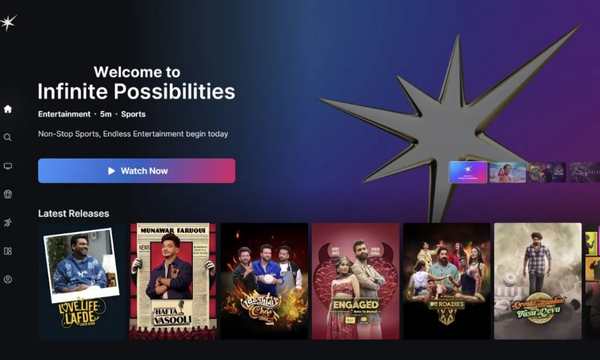
Tips to Improve the Streaming Experience on JioHotstar
To avoid the dreaded buffering and ensure an ultra-smooth experience, follow these professional tips:
- Stable connection: Use a reliable Wi-Fi connection (preferably 5 GHz) and restart the router before big games to optimize the network.
- Adjust quality: If the connection is unstable, use the player settings to manually reduce the video resolution. It is better to see well in 720p than to freeze in 4K.
- Close background applications: Eliminate unnecessary downloads and tabs to free up maximum bandwidth for streaming.
- Clear cache: Regularly remove temporary data from the JioHotstar application in your mobile phone settings to improve performance.
There is no doubt that JioHotstar is the future of cricket and entertainment. With the platform merger, it has become a giant that prioritizes the user experience with incredible features.
By understanding your plans and applying the optimization tips, you guarantee that you won’t miss a single moment of glory.
It is time to dive headfirst into this enhanced cricket experience. Master JioHotstar and discover a universe of sports and shows without limits.