Living with diabetes involves tracking different types of health information, such as blood glucose levels, diet, physical activity, and medication use.
Ad
For some people, digital tools can help organize these records and make it easier to manage their daily routines.
Diabetes:M is an app designed to record diabetes-related information, view charts, and generate reports.
Ad
The platform offers free features and additional options through a subscription.
But is this app worth the investment? In this article, you will learn about its main features, the differences between its versions, and important precautions to consider before using it.

What is Diabetes:M and Who is it Intended For?
Diabetes:M is an app for managing diabetes-related information, available on mobile devices and other compatible platforms.
According to the developer’s official website, the tool was developed for people with different types of diabetes and prediabetes.
It can also be used by those who want to organize information related to caring for a family member.
Its features include tracking blood glucose, food intake, medication, and physical activity, as well as generating reports to share with healthcare professionals.
It is important to note that the app serves as a tool for recording and monitoring information. It does not replace appointments, tests, or individualized guidance from a healthcare team.
Main Tools for Your Daily Monitoring
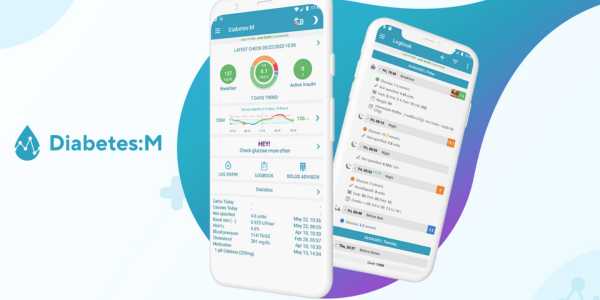
Diabetes:M brings together several features for recording information related to daily diabetes care.
According to the app’s official documentation, its main features include:
- Logbook: Record blood glucose, insulin, carbohydrates, medication, weight, and blood pressure.
- Charts and analysis: View recorded data over time.
- Reports: Generate documents in different formats, depending on the subscription plan.
- Integration: Import data from compatible sources and devices.
- Reminders: Set notifications for monitoring-related activities.
These features make it possible to keep information in one place and may facilitate sharing records during appointments.
The usefulness of the data depends on the accuracy of the entries and their proper interpretation by a healthcare professional.
First Steps: How to Easily Set Up the App
Before using Diabetes:M, it is important to review the available settings and understand how to record your information.
The process may vary depending on the installed version, but the developer’s guide outlines steps such as:
- Set up your profile: Enter the information requested by the app.
- Choose your units: Select the blood glucose unit and measurement system.
- Configure carbohydrates: Choose the unit used to record food intake.
- Enter the requested information: Provide the details required for the selected features.
- Select your therapy: Choose the option corresponding to your treatment.
- Review clinical settings: Check the parameters before using features related to insulin dose calculations.
The official setup guide explains these steps.
Settings such as blood glucose targets, insulin sensitivity, and insulin-to-carbohydrate ratios should follow guidance from the healthcare professional responsible for your treatment, rather than estimates made independently.
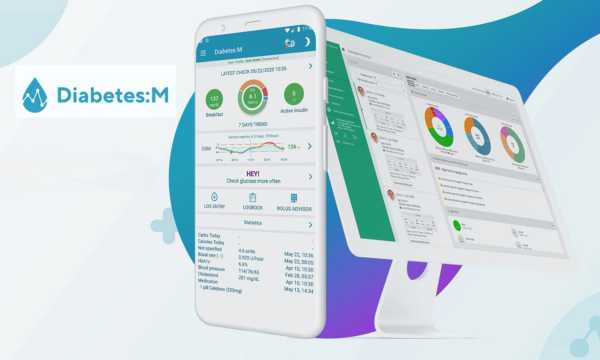
App Features and Interface (Google Source)
Blood Sugar Logging: Analysis at Your Fingertips
Tracking blood glucose can help you monitor changes in glucose levels and provide relevant information during appointments.
According to the U.S. Centers for Disease Control and Prevention (CDC), monitoring and recording blood glucose can help identify patterns and support the healthcare team in evaluating care. Testing frequency and targets should be individualized.
In Diabetes:M, you can record measured values and relate them to other information, such as food intake, insulin, and physical activity. The app also offers charts that let you view records across different periods.
These tools help organize your history, but charts alone do not establish diagnoses or determine what changes should be made to treatment.
Carbohydrate Counting and Integrated Food Diary
Diabetes:M offers features for recording foods, portions, and nutritional information. According to the official website, the app uses food databases, including FatSecret, USDA, and BEDCA, and allows users to add custom foods.
Carbohydrate counting may be part of the meal plan for people who use insulin, but its application depends on individual needs.
The U.S. National Institute of Diabetes and Digestive and Kidney Diseases (NIDDK) explains that carbohydrate counting is one strategy used in meal planning and can help some people determine the amount of insulin needed according to their treatment plan.
Diabetes’ food diary can make it easier to record meals, but nutritional values depend on the foods selected, the portions entered, and the accuracy of the available data.
Bolus Calculator: Helping with Insulin Doses
One of Diabetes’ features is the Bolus Advisor, a tool that calculates estimated insulin doses based on information entered by the user.
According to the official documentation, the feature considers data such as carbohydrates, reported blood glucose, active insulin, and other configured parameters.
The app also describes features related to extended boluses, physical activity, and illness. Availability may vary by region.
Despite these features, caution is essential. A calculator’s result does not guarantee that a dose is appropriate for every situation.
Parameters such as insulin sensitivity and insulin-to-carbohydrate ratios should be established with professional guidance.
Do not change doses or clinical settings based solely on an app’s suggestion. The developer itself states that therapy decisions should be made in consultation with a specialist.
Sharing Reports with Your Doctor: Is It Simple?
Yes, and this is one of the great differentiators of Diabetes:M.
The ability to present your data in an organized manner greatly facilitates communication with your doctor and makes consultations more productive.
You can generate reports in PDF, HTML, or XLS and share them via email or other means. This allows for quick identification of trends and adjustments to treatment with more safety and precision.
Free Version vs. Premium: What Are the Differences?
Diabetes offers free features and additional functionality through a subscription. Availability may vary depending on the operating system, region, and app version.
Features promoted by the developer include:
- Daily tracking: Organize information about blood glucose, food intake, and medication.
- Charts and reports: View recorded data.
- Advanced reports: Additional export options, depending on the plan.
- Pattern analysis: Tools for examining recorded information.
- Expanded food database: Access additional nutrition features.
- Synchronization: Share data between compatible devices.
- Bluetooth integration: Connect to certain compatible glucose meters.
Check the official features page and your device’s app store to verify current features and prices.
Diabetes Monitor is a separate solution designed to help healthcare professionals monitor patients. Its features and access requirements should be checked on the service’s official website.
Conclusão
Diabetes:M is a solid, reliable solution capable of bringing more monitor and security to your routine.
With its integrated tools, clear graphs, and detailed tracking resources, it helps make diabetes management more straightforward and conscious, allowing you to make informed decisions about your health every day.